Law
Google Tag Manager consent: the Hanover court ruling
On this page
The short answer
Under the Hanover ruling, Google Tag Manager needs the visitor's consent before it loads in the browser. The court based this on § 25(1) TDDDG, the German rule for storing and reading information on a device, and on Art. 6(1)(a) GDPR for sending the IP address to Google. § 25 TDDDG puts Art. 5(3) of the ePrivacy Directive into German law. The court rejected the exception for strictly necessary services.
So the container may only load after the visitor agrees to statistics or marketing. Google's snippet sitting unconditionally in the <head> does not meet that. The ruling comes from a first-instance court, and we found no decision on appeal as of 28 November 2026.
The ruling: VG Hannover, 19 March 2025, 10 A 5385/22
The 10th chamber of the Verwaltungsgericht Hannover, the administrative court in Hanover, dismissed an action by the newspaper publisher Neue Osnabrücker Zeitung against an order from the data protection authority of Lower Saxony. The full German text is in the VORIS case law database. The court's press release on the hearing names the parties.
The authority had ordered the publisher to collect valid consent. For Google Tag Manager, the publisher had to either collect consent or remove the service from the site. The authority tested the site on 15 November 2022. On the first page view, the browser contacted googletagmanager.com before the visitor had chosen anything. According to the judgment, the IP address, device configuration, country and referrer URL went to a server in the US, and the script gtm.js was stored on the device.
Headnote 4 of the judgment says that using Google Tag Manager requires consent under § 25(1) TTDSG and Art. 6(1)(a) GDPR. The law has been called TDDDG since 14 May 2024. That amendment replaced the term "telemedia service" with "digital service" in § 25 and left the substance unchanged.
- § 25(2) no. 2 TDDDG allows access without consent only where it is strictly necessary for a service the user explicitly requested. The court found that Tag Manager is no such service. In the court's view it serves the publisher's interest in funding its site.
- The publisher argued that Tag Manager only ran the scripts for the consent prompt. The court pointed out that the site used a separate consent management platform from Sourcepoint for that.
- The court also held that Tag Manager is not technically required to load tools after consent. A site's own script could do the same job, and Tag Manager is only easier for site operators.
- The court treated the unencrypted IP address as personal data. No legal obligation under Art. 6(1)(c) GDPR applied, and the balancing test under Art. 6(1)(f) GDPR came out in favour of the users.
What the court found wrong with the banner
The banner's first layer offered "Alle akzeptieren" (accept all), "Akzeptieren & schließen x" (accept and close) and "Einstellungen" (settings), with no button to reject. The court called the x misleading, because visitors read it as a close button. The banner did not state on its first layer that more than a hundred third parties were involved. The right to withdraw and the transfers to third countries only appeared after scrolling.
Choosing "Auswahl speichern" (save selection) brought the banner back on every new visit to the site, while "Alle akzeptieren" (accept all) was remembered. In its press release of 20 May 2025, the authority concluded that a site offering "Alle akzeptieren" must show a clearly visible "Alles ablehnen" (reject all) button on the first layer. The article Cookie banner design rules shows a banner with equal buttons.
How binding the ruling is
The judgment binds only the parties to the case, and it comes from a first-instance court. The full text in VORIS says nothing about whether it is final. We found no decision by the Higher Administrative Court of Lower Saxony in this case as of 28 November 2026. We check the status every 90 days and will update this section when it changes.
The reasoning follows the wording of § 25 TDDDG, and the Lower Saxony authority had its position confirmed by the court. Other authorities and courts can still assess Tag Manager differently.
What it means for GTM
The core of the reasoning applies to every site that loads Tag Manager in the browser. Fetching gtm.js alone sends the IP address to Google and stores the script on the device, whatever tags the container holds. A container that only runs Google tags with denied Consent Mode signals before the choice still loads before the choice.
The court did not rule on server-side tagging, where your own server runs the tags. It also did not rule on tag management systems in general. It assessed Google Tag Manager as the publisher had set it up.
- If Google's snippet sits directly in the
<head>, the container loads on the first page view. Under the ruling, that load has no consent. - If the consent tool itself runs inside Tag Manager, the container loads before the banner. The court rejected the argument that GTM is needed to show the consent prompt.
- The
<noscript>part of the snippet loads an iframe from googletagmanager.com when JavaScript is off. Without JavaScript no banner runs, so there is no consent. Remove that part. - Advanced consent mode loads Google tags when the page opens. Loading the container early for it runs into the same problem as the publisher in Hanover.
Load GTM only after consent
Limes loads Tag Manager for you when you enter the container ID in the site editor under Google Tag Manager ID. With the Germany & EU profile, the default for new sites, and the default Basic setting, the Limes script only adds gtm.js after the visitor agrees to statistics or marketing. Until then the browser sends no request to googletagmanager.com. On a site with the opt-out profile, and for visitors whom a geo rule assigns to opt-out or notice, statistics and marketing start as granted, so Basic loads the container at once.
In Advanced, Limes loads the container when the page opens, except for visitors who need prior consent. For them Limes still waits for the choice. On a site with the Germany & EU profile and no geo rules, that is every visitor. With geo rules, it is visitors from the EU, the EEA, the UK and Switzerland, plus visitors whom a rule assigns to opt-in. Limes detects the region only when a site has geo rules. The compliance check shows a warning as soon as you switch to Advanced and asks you to mention it in your privacy policy.
- Add the Limes script as the first script in the
<head>. Copy the line with your site ID from the Install page in the Limes app. - Enter the container ID in the format
GTM-XXXXXXXin the editor and leave Google Consent Mode behaviour on Basic. - Remove your existing GTM snippet from
<head>and<body>, including the<noscript>part. Otherwise the container keeps loading before the choice. - If you prefer to keep your own snippet, set it to
type="text/plain"and adddata-limes-category="statistics"or"marketing". Limes runs it only after the visitor agrees to that category. - Add a footer link that calls
window.Limes.openSettings(), so visitors can change their choice.
Only needed if you do not load the container through the editor field. Replace GTM-XXXXXXX with your container ID.
<script src="https://cdn.uselimes.com/v1/YOUR-SITE-ID.js"></script>

<script type="text/plain" data-limes-category="statistics">
  (function(w,d,s,l,i){w[l]=w[l]||[];w[l].push({'gtm.start':
  new Date().getTime(),event:'gtm.js'});var f=d.getElementsByTagName(s)[0],
  j=d.createElement(s),dl=l!='dataLayer'?'&l='+l:'';j.async=true;j.src=
  'https://www.googletagmanager.com/gtm.js?id='+i+dl;f.parentNode.insertBefore(j,f);
  })(window,document,'script','dataLayer','GTM-XXXXXXX');
</script>Consent Mode in GTM
Once the container only loads after consent, the next question is which tags inside it may fire. A visitor who agrees to statistics only loads the container, but ad tags must still stay off. Consent Mode handles that.
For visitors who need prior consent, the Limes script sets all four signals, ad_storage, analytics_storage, ad_user_data and ad_personalization, to denied before the choice. After the choice it sends consent update. Statistics controls analytics_storage, and marketing controls the three ad signals. Because Limes runs before the container, the defaults are already in the dataLayer when GTM starts. You do not need a separate consent tag on the Consent Initialization trigger. Consent Mode v2 is included in every plan, Free included.
- In Tag Manager, turn on the consent overview under Admin, Container Settings. It shows which consent each tag checks.
- In the consent overview, Google tags such as Google Analytics and Google Ads show built-in consent checks. They follow the signals without further setup.
- Tags from other vendors follow Consent Mode only if their template has consent checks, and the consent overview shows whether it does. For a tag without them, choose "Require additional consent for tag to fire" with
ad_storage. The tag then fires only when that signal isgranted. - You can also fire such tags on a custom event. After every choice Limes pushes
cookie_consent_updateto thedataLayer, pluscookie_consent_statisticsorcookie_consent_marketingfor each category the visitor accepted.
Check it with the scan
Checking whether your container loads before the choice takes a few minutes. Open the site in a private window, open the Network tab in the developer tools and filter for googletagmanager. Do not click anything in the banner. Until you agree, no request for gtm.js may appear. Repeat the test after clicking reject.
The free Limes scan opens your home page in Chromium without clicking anything and lists the third-party hosts that load before the choice. It labels googletagmanager.com as a tracking service. The scan checks the home page only and needs no account.
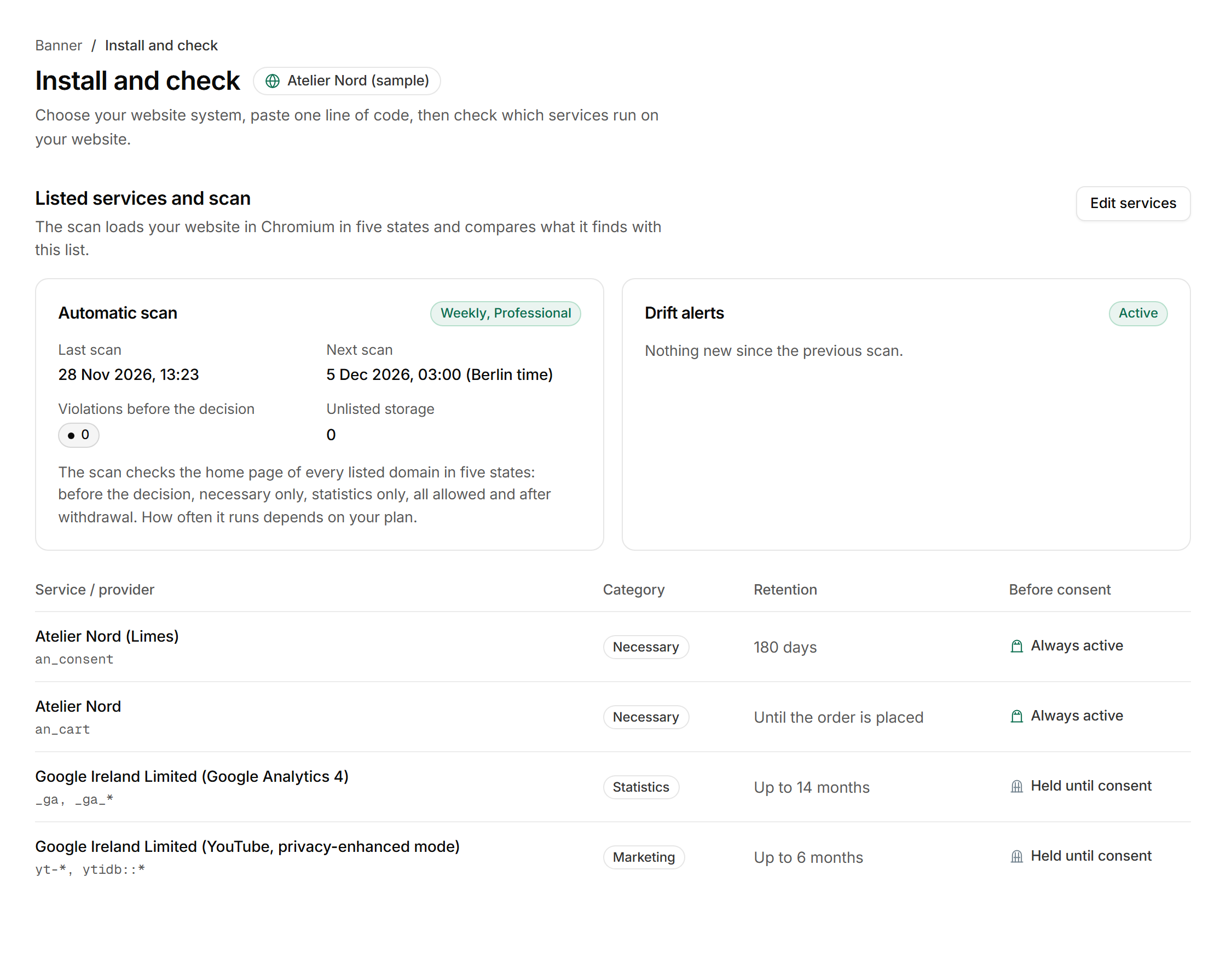
The cookie scanner in your Limes account checks the site on a schedule in five states: before the choice, necessary only, statistics only, all allowed and after withdrawal. On the Free plan it scans monthly. It reports cookies set before consent and storage you have not assigned to a service yet.
Where to go next
If GA4 runs through your container, the article GA4 cookie consent and the guide Google Analytics and Google Ads cover the setup. The developers page documents the script, the categories and the JavaScript API for custom sites.
Frequently asked questions
Does Google Tag Manager need cookie consent?
In Germany, the Hanover administrative court says yes. It held that Tag Manager needs consent under § 25(1) TDDDG and Art. 6(1)(a) GDPR, because loading it sends the IP address to Google and stores a script on the device.
Is Google Tag Manager strictly necessary?
Not according to the ruling. The court rejected the exception in § 25(2) no. 2 TDDDG, because visitors do not explicitly request Tag Manager and a site's own script can do the same job.
Can GTM load before consent if I use Google Consent Mode?
Not under the Hanover court's reasoning. Consent Mode controls what the tags in the container do. The IP address reaches Google when the browser fetches gtm.js, before any signal applies.
Is the Hanover ruling final?
The full text in VORIS says nothing about whether it is final. We found no decision by the Higher Administrative Court of Lower Saxony in this case as of 28 November 2026.
Sources
- Urteil zu manipulativem Cookie-Banner: "Alles ablehnen"-Schaltfläche ist ein Muss, press release no. 08/2025(opens in a new tab)
- "Alles ablehnen"-Schaltfläche im Einwilligungsbanner auf Webseite unter Umständen ein Muss(opens in a new tab) Background article on the banner and the order on Google Tag Manager, in German.
- § 25 TDDDG, Schutz der Privatsphäre bei Endeinrichtungen(opens in a new tab) Terms changed by Art. 8 of the act of 6 May 2024, BGBl. 2024 I No. 149, in force since 14 May 2024.
- Directive 2002/58/EC (ePrivacy Directive)(opens in a new tab) Art. 5(3).
- Regulation (EU) 2016/679 (General Data Protection Regulation)(opens in a new tab) Art. 6(1)(a), (c) and (f).
- Tag Manager consent mode support(opens in a new tab) Consent overview, built-in and additional consent checks, Consent Initialization trigger.
- Consent mode overview(opens in a new tab) Basic and Advanced consent mode.