Banner design
What courts and regulators require from cookie banner design
On this page
The short answer
If a layer of your banner has an Accept button, the same layer needs a Reject option that is just as easy to use. Boxes for analytics and marketing start unticked. Closing the banner, scrolling or carrying on browsing is not consent. Withdrawing consent later must take no more effort than giving it.
These rules come from Article 4(11) and Article 7 GDPR, Article 5(3) of the ePrivacy Directive and its national versions such as § 25 of the German TDDDG, and from rulings of the Court of Justice of the EU and German courts. The EU data protection authorities agreed on a shared baseline in 2023, but they do not read every point the same way. Each rule below links to its source.
Equal buttons
Article 4(11) GDPR defines consent as a freely given, specific, informed and unambiguous indication of the visitor's wishes, given by a clear affirmative action. Article 5(3) of the ePrivacy Directive requires consent before a site stores or reads cookies and similar data on the device, and Article 2(f) of the Directive, read with Article 94(2) GDPR, ties that consent to the GDPR definition. A choice is only free when saying no is a real option. A banner that pushes visitors towards Accept fails that test.
Sample data
Reject belongs on the first layer
The clearest ruling on the first layer comes from the Higher Regional Court of Cologne. On 19 January 2024, in case 6 U 80/23, it prohibited a banner whose first layer offered Accept and a Settings button, but no way to refuse. Refusing took a second layer, and even there the buttons "Accept all" and "Save" left an average visitor unsure which one rejects cookies. The court held that the banner offered no refuse option equivalent to consent on either layer, so the consents it collected were neither free nor informed. It did not allow a further appeal.
The same chamber drew a limit two months earlier. In case 6 U 58/23 of 3 November 2023 it dismissed a claim that would have forced the defendant to offer Reject in the same form, function and colour as Accept. The claim was too broad, because it amounted to prescribing one specific banner design. Whether the GDPR requires that kind of equality the court left open.
Neither ruling requires Reject to match Accept in form and colour. The court in 6 U 80/23 also did not decide whether a clear Reject button on the second layer alone would have been enough.
The rule that Reject belongs on the same layer as Accept comes from the data protection authorities. In paragraph 8 of the EDPB report described below, a vast majority of them treat a layer with a consent button but no reject option as an infringement. That covers a banner whose only way to refuse is a detour through the settings, as in 6 U 80/23. Paragraph 14 of the report adds a case about links. If the only way to refuse is a link set in running text, without enough visual support to draw an average visitor's attention, the consent is not valid.
Colour, size and contrast
No authority sets a colour standard. Paragraph 17 of the taskforce report says a general banner standard for colour or contrast cannot be imposed on controllers, so each banner is assessed on its own. Paragraph 18 says that at least one design could be manifestly misleading. It is a refuse button whose text contrasts so little with the button background that virtually no one can read it.
The report does not rule out a coloured Accept button next to a white Reject button. Such a banner is assessed case by case. Under paragraph 17 the authorities check whether the colours and contrast are obviously misleading and lead to a consent the visitor did not intend.
For a number you can test against, use the W3C accessibility rules. WCAG 2.2 asks for a contrast of 4.5:1 for normal text and 3:1 for the visible boundary of a control. None of the sources cited here makes WCAG values a legal requirement for banners, but they turn "readable" into a measurement.
- Reject and Accept have the same height, width and font size.
- Both are buttons. Neither is a text link.
- The label of each button reaches at least 4.5:1 against the button colour.
- The Reject button stands out from the banner background by at least 3:1, through its fill or its border.
Wording
The EDPB Guidelines 03/2022 on deceptive design patterns, version 2.0, adopted on 14 February 2023, describe interface patterns that steer people into choices against their own data protection interests. The guidelines are written for social media platforms. They state that similar patterns also appear on websites and in cookie banners, though not always in the same form. The guidelines take the fairness principle in Article 5(1)(a) GDPR as the starting point for assessing a pattern.
Two of the patterns are about banner text. Emotional Steering uses words or visuals that make people feel rewarded for agreeing, or guilty or anxious for declining. Ambiguous wording leaves people unsure what happens to their data. The guidelines give the sentence "Your data might be used to improve our services" as an example, because both "might" and "services" are too vague to count as clear and plain language.
Examples of banner phrases that fit these two patterns:
- Reject labels that blame the visitor, such as "No, I don't want a better website".
- Rewards for agreeing, such as "Accept for the best experience".
- A "Recommended" tag on the Accept button.
- Claims such as "100% GDPR compliant" that say nothing about the processing.
- Purposes such as "improving our services" in place of the actual processing.
Pre-ticked boxes
On 1 October 2019, in case C-673/17, Planet49, the Court of Justice of the EU ruled that a pre-ticked checkbox, which the user has to untick to refuse, does not give valid consent to cookies. That holds whether or not the stored data is personal data. The court also ruled that the visitor must be told how long the cookies last and whether third parties can access them.
Germany's Federal Court of Justice applied the ruling on 28 May 2020 in case I ZR 7/16, known as Cookie-Einwilligung II. According to its press release No. 067/2020, a pre-ticked cookie checkbox puts users at an unreasonable disadvantage. Recital 32 GDPR states the same for every kind of consent. Silence, pre-ticked boxes and inactivity do not count.
The settings layer of your banner therefore opens with analytics and marketing switched off. Only strictly necessary cookies may show as active and locked. Paragraph 10 of the taskforce report confirms that pre-ticked boxes on the second layer do not give valid consent either.
Close buttons and scrolling
In the Cologne case 6 U 80/23 the banner had a button labelled "Akzeptieren & Schließen" ("Accept and close") next to an X. The court found the design intransparent. People know an X as the way to close a window, not as a way to agree to cookies. Consent collected that way was neither free nor unambiguous.
If your banner has an X, it may hide the banner at most, without allowing any cookie that needs consent. The rulings and EDPB documents cited here do not say whether an X that rejects tells visitors clearly enough what happens. The Limes banner has no close X and uses a labelled Reject button.
Scrolling and swiping are not consent either. Paragraph 86 of the EDPB Guidelines 05/2020 on consent says such actions will not under any circumstances meet the requirement of a clear affirmative action, because they are hard to tell apart from normal browsing. Paragraph 84 adds that merely continuing the ordinary use of a website does not indicate consent. That covers notices such as "By using this site you agree to cookies".
Withdrawing consent
Article 7(3) GDPR says withdrawing consent must be as easy as giving it, and visitors must learn about that right before they consent. Paragraph 114 of the EDPB consent guidelines spells out the consequence. If consent took one click, withdrawal has to be possible just as easily, in the same interface.
The taskforce report suggests two ways in paragraph 32: a small icon that stays visible on every page, or a link in a visible, standard place. Paragraph 35 adds that authorities cannot impose one specific solution, and they check case by case whether withdrawal is as easy as consent. A "Cookie settings" link in the footer of every page is the common answer.
With Limes you open the settings dialog by calling window.Limes.openSettings(), for example from a footer link. When a visitor withdraws a category, the Limes script deletes the cookies that match the name patterns you set for that category. If a script of the withdrawn category has already run, the Limes script reloads the page so that script stops.
One link in the site footer opens the same dialog the visitor used to consent.
<a href="#" onclick="window.Limes.openSettings(); return false;">Cookie settings</a>What Limes checks before you publish
The Limes cookie banner shows Reject and Accept on the first layer as buttons of the same height, width and font. Reject comes first by default. The banner has no close X. The X in the settings dialog only closes the dialog and records no choice.
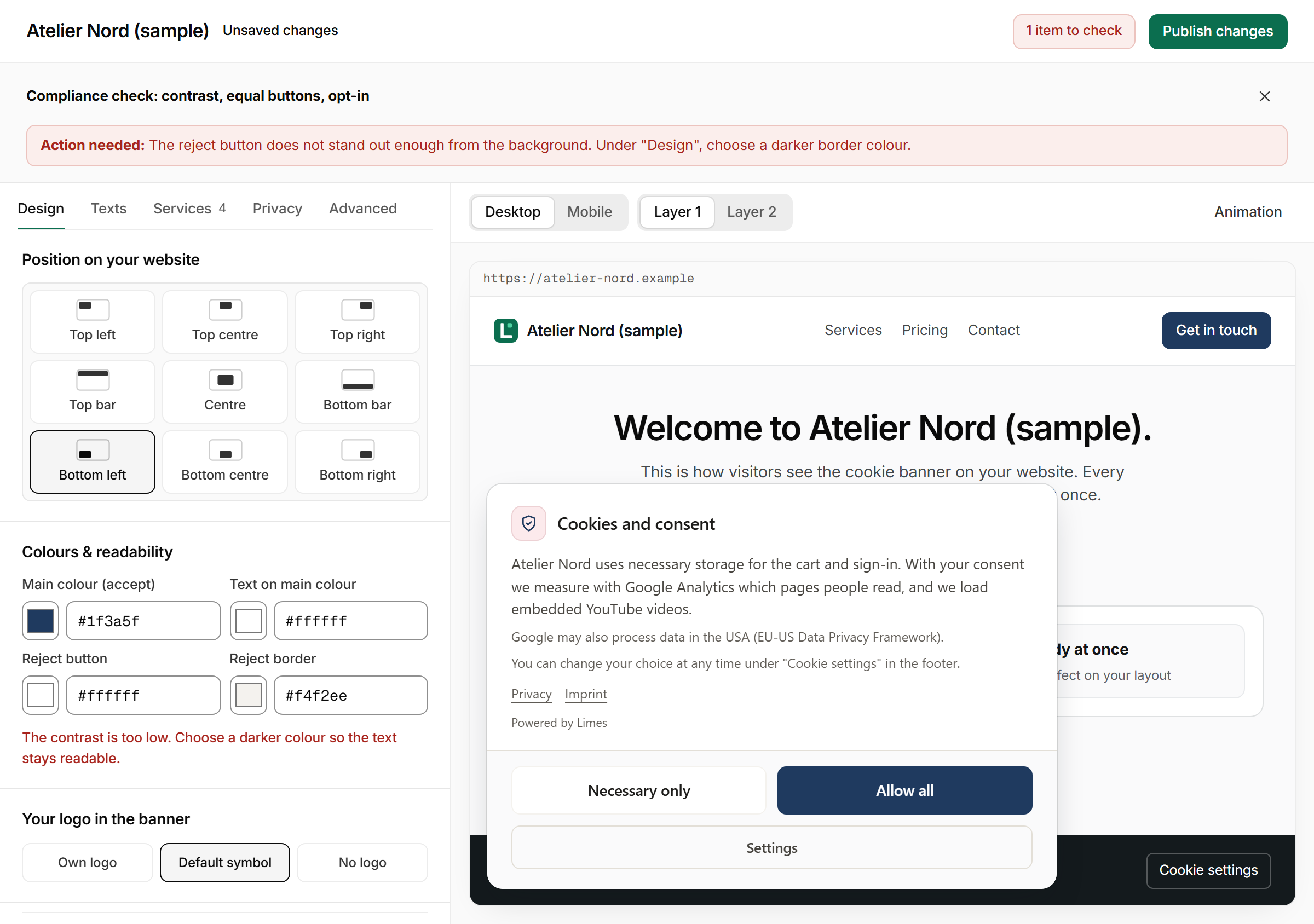
Each time you publish a change, Limes checks the configuration first. An error stops the publish and names the field to fix. A warning does not block. The checks that concern banner design are:
- The labels of the Accept and Reject buttons reach at least 4.5:1 against the button colour.
- The Reject button stands out from the banner background by at least 3:1, through its fill or its border.
- The main text and the secondary text of the banner reach at least 4.5:1.
- The title, banner text, the Accept and Reject labels and the settings intro contain none of a list of German pressure phrases, such as "empfohlen" (recommended), "bestes Erlebnis" (best experience), "100 % DSGVO" or "Nein, ich möchte nicht" (No, I don't want).
- In the eu-strict profile, analytics and marketing are off until the visitor decides.
- For the regions EU, EEA, UK and Switzerland, Limes allows neither an opt-out mode nor a notice without a Reject option.
- The cookie in which Limes stores the choice is listed as strictly necessary in the cookie list.
- If an entry in the cookie list is marked as a third-country transfer, the third-country notice contains "USA", "Drittland" or "Drittstaat".
- Each variant of a banner test that is not stopped goes through the same contrast and wording checks.
What the check cannot decide
The check measures what a configuration lets it measure. Whether your purposes describe the real processing, and whether a cookie is truly strictly necessary, you decide with your data protection officer. The wording list covers German phrases only. The third-country check knows only "USA" and the German words "Drittland" and "Drittstaat", so a notice that says "third country" fails it. Review banner text in other languages yourself. What consent requires for your site as a whole is on the page about GDPR cookie consent. All features are on the features page, and the plans with their limits are on the pricing page.
Frequently asked questions
Does a cookie banner need a Reject all button on the first layer?
In January 2024 the Higher Regional Court of Cologne prohibited a banner that offered no refuse option equivalent to consent on either its first or its second layer. According to paragraph 8 of the EDPB Cookie Banner Taskforce report, a vast majority of EU data protection authorities treat an Accept button without a reject option on the same layer as an infringement. The Limes banner shows Reject next to Accept on the first layer.
Can the Accept button be coloured and the Reject button grey?
There is no fixed colour standard, and authorities assess each banner on its own. Paragraph 18 of the EDPB Cookie Banner Taskforce report says a Reject button whose text virtually no one can read could be manifestly misleading. Limes blocks publishing if either button label falls below a contrast of 4.5:1.
Does scrolling or continuing to browse count as cookie consent?
No. Recital 32 GDPR and paragraph 86 of the EDPB Guidelines 05/2020 say scrolling, swiping and inactivity are not a clear affirmative action. Paragraph 84 of the same guidelines says that merely continuing the ordinary use of a website does not indicate consent.
Sources
- OLG Köln, judgment of 19 January 2024, 6 U 80/23(opens in a new tab) No equivalent refuse option on the first or second layer, "Akzeptieren & Schließen" next to an X found intransparent.
- OLG Köln, judgment of 3 November 2023, 6 U 58/23(opens in a new tab) Claim for Reject in the same form, function and colour dismissed as too broad.
- Judgment in case C-673/17, Planet49(opens in a new tab) A pre-ticked checkbox is not valid consent.
- Report of the work undertaken by the Cookie Banner Taskforce(opens in a new tab) Para. 8 first layer, para. 10 pre-ticked boxes, para. 14 link design, paras. 17 to 19 colour and contrast, paras. 32 to 35 withdrawal.
- Guidelines 03/2022 on deceptive design patterns in social media platform interfaces, version 2.0(opens in a new tab) Emotional Steering and Ambiguous wording or information.
- Guidelines 05/2020 on consent under Regulation 2016/679(opens in a new tab) Para. 84 continued use, para. 86 scrolling, para. 114 one-click withdrawal.
- Regulation (EU) 2016/679, General Data Protection Regulation(opens in a new tab) Article 4(11), Article 5(1)(a), Article 7(3), Article 94(2), recital 32.
- Directive 2002/58/EC, Directive on privacy and electronic communications(opens in a new tab) Article 2(f) consent, Article 5(3) storing and reading information on the device.
- § 25 TDDDG, protection of privacy in terminal equipment(opens in a new tab) German rule on storing and reading information on the device.
- Web Content Accessibility Guidelines (WCAG) 2.2(opens in a new tab) 1.4.3 contrast 4.5:1 for text, 1.4.11 contrast 3:1 for controls.