Consent rate
Cookie consent rate: definition, measurement and fair levers
On this page
The short answer
The cookie consent rate is the share of banner impressions that end with consent to at least one optional category. In Limes the optional categories are statistics and marketing. A visitor who sees the banner and never clicks stays in the denominator and pulls the rate down.
Tools disagree because they divide by different things: page views, visitors, banner impressions or only the visitors who clicked. Language, placement, a specific purpose text and a layout that works on the device are fair levers. A reject button that is harder to find than accept raises the number. Under Article 7(1) GDPR the site still has to prove that each of those consents is valid. The EDPB Cookie Banner Taskforce named a reject button with unreadable contrast as a practice that could be manifestly misleading.
Definition
Limes computes each rate as one count divided by another, rounded to four decimal places. When the denominator is zero the function returns no value rather than zero, so an empty week does not look like a bad week.
The Limes script counts one banner impression per page view on which the banner actually appears. A decision is a click on Accept all, Reject all or Save selection. A decision counts as consent when it allows statistics, marketing or both. Save selection with statistics only counts. Reject all does not.
In regions where a geo rule shows a notice instead of an opt-in banner, the notice button also counts as a decision, with the categories that were preset. The Limes app labels the three buttons All allowed, Necessary only and Own selection.
The three rates Limes reports
| Metric | Numerator | Denominator |
|---|---|---|
Consent rate (consentRate) | Decisions that allow statistics or marketing | Banner impressions |
Accept all rate (acceptAllRate) | Clicks on Accept all | Decisions |
Reject all rate (rejectAllRate) | Clicks on Reject all | Decisions |
Excerpt from the Limes source. custom is a click on Save selection.
export function ratio(part: number, total: number): number | null {
  if (total <= 0) return null;
  return Math.round((part / total) * 10_000) / 10_000;
}

s.consentRate = ratio(s.optIns, s.impressions);
s.acceptAllRate = ratio(s.acceptAll, s.decisions);

const decisions = acceptAll + rejectAll + custom;
rejectAllRate: ratio(rejectAll, decisions),The rate for a whole site
For each region and each A/B test variant, Limes stores whether a decision allowed statistics or marketing and applies the formula above as written. The daily rows for the whole site keep statistics and marketing as two separate counts. The overview therefore takes the larger of the two and divides it by impressions.
That gives a lower bound. The true rate is never below it. It can be a little higher when some visitors allowed only statistics and others only marketing.
Why tools show different rates
No law and no industry body defines the consent rate. Each consent tool and each analytics tool picks its own numerator and denominator. Check three things before you put two numbers side by side.
The denominator
A tool that divides by decisions drops every visitor who ignores the banner. Its rate goes up without a single extra person consenting. A tool that divides by page views also counts views where no banner appeared, and its rate goes down.
The numerator moves too. Some tools count only Accept all as consent. Others, Limes among them, count any decision with at least one optional category. Ask the vendor for both halves of the fraction before a number goes into a report.
The names differ too. Didomi's metric glossary calls opt-ins divided by choices the consent rate and opt-ins divided by banner displays the opt-in rate. The Limes consent rate divides by impressions, so it matches what Didomi calls the opt-in rate.
Bots
Crawlers, uptime monitors and SEO tools load pages, render the banner and never click. A tool that counts them as impressions reports a lower rate. Limes drops impressions whose user agent matches a list of known patterns, for example Googlebot, Lighthouse, Pingdom, AhrefsBot and Headless Chrome.
A bot that sends a normal browser user agent passes that filter. So Limes reports a filtered rate, and it does not claim a clean one.
Returning visitors
A visitor who has already decided does not see the banner again until the site's policy version changes or the stored choice expires. In the Limes site editor the policy version is the Text version field, and publishing a changed banner does not change it. In Limes that visit creates no impression and stays out of the rate. A tool that divides by visitors or sessions counts it and lands on a different value.
It also works the other way. A visitor who ignores the banner on three pages and rejects on the fourth creates four impressions and one decision. Sites where people read many pages per visit show a lower rate than sites where most visitors leave after one page. That is how the metric is built. It says nothing about which banner is better.
What moves the rate
Article 5(3) of the ePrivacy Directive requires consent before a site stores or reads non-essential information on a device. Article 94(2) of the GDPR turns references to the old Directive 95/46/EC into references to the GDPR, so that consent must meet the definition in Article 4(11) GDPR: freely given, specific, informed and unambiguous. The Court of Justice confirmed this reading for cookies in Planet49.
That gives a clear test for any banner change. A change is fair when it makes the choice easier to understand. It is not fair when it pushes the choice in one direction.
Fair levers
These change how well visitors understand and reach the banner. Change one at a time so you know which change had the effect. The article on A/B testing cookie banners covers how to set up a test where both variants are fair.
- Language. Paragraph 67 of the EDPB Guidelines 05/2020 asks for a message that is easily understandable for the average person and not only for lawyers. Plain words in the language of the page help with that. The Free plan includes one banner language, and higher plans include more.
- Placement. A bar along the bottom, a box in a corner and a centred dialog differ in how many visitors notice the banner before they start reading. A dialog that hides the content until the visitor accepts is a cookie wall, and paragraph 39 of the same guidelines says that consent is then not freely given.
- Purpose text. Among the minimum information in paragraph 64 are who the controller is, the purpose of each processing operation, what data is collected and that consent can be withdrawn. "We count which pages people read so we know what to write next" says more than "for a better experience".
- Device. On a phone a large banner covers the page. On a desktop a thin bar is easy to miss. We recommend keeping both buttons visible without scrolling, so reject stays on the same layer as accept on a phone too.
Levers that are not allowed
The patterns below raise the rate and weaken every consent behind it. Under Article 7(1) GDPR the controller must be able to show that valid consent exists. With one of these patterns in the banner, that proof gets harder, and a rate built on those consents says little. The article on cookie banner design shows a layout where reject carries the same weight as accept.
- No reject option on the layer with the accept button. In the EDPB Cookie Banner Taskforce report of 17 January 2023, a vast majority of authorities called this an infringement, paragraph 8.
- Pre-ticked boxes. The Court of Justice ruled on 1 October 2019 in Planet49, C-673/17, that a pre-ticked checkbox is not valid consent. Paragraph 79 of the EDPB guidelines says the same.
- Colour and contrast that hide the alternative. The taskforce named a reject button whose text has so little contrast with its background that almost nobody can read it as a practice that could be manifestly misleading, paragraph 18. Paragraph 17 adds that the taskforce sets no general colour or contrast standard and that each banner is assessed case by case.
- Scrolling as consent. Paragraph 86 of the EDPB guidelines states that scrolling or swiping will not under any circumstances count as a clear affirmative action.
- Asking again after every reject. The EDPB Guidelines 03/2022 on deceptive design patterns call this continuous prompting. People give in because they are tired of saying no.
- Hard withdrawal. Article 7(3) GDPR requires withdrawing consent to be as easy as giving it.
Benchmarks
Limes publishes no benchmark for the cookie consent rate, neither across all sites nor by industry. We do not have measured data that would support such a number. For the same reason the Consent Rate Benchmark add-on is off sale until its reference values come from a named source or from measured data.
Figures that circulate online have two problems. They rarely state the numerator and denominator, and the sections above show how far two definitions can drift apart. Many also come from banners that bury the reject option. A rate earned that way is not a target for a banner where both buttons carry equal weight.
Compare your site with itself instead. Keep the same formula and look at several weeks before and after a change, or run two variants over the same period.
Measure it in Limes
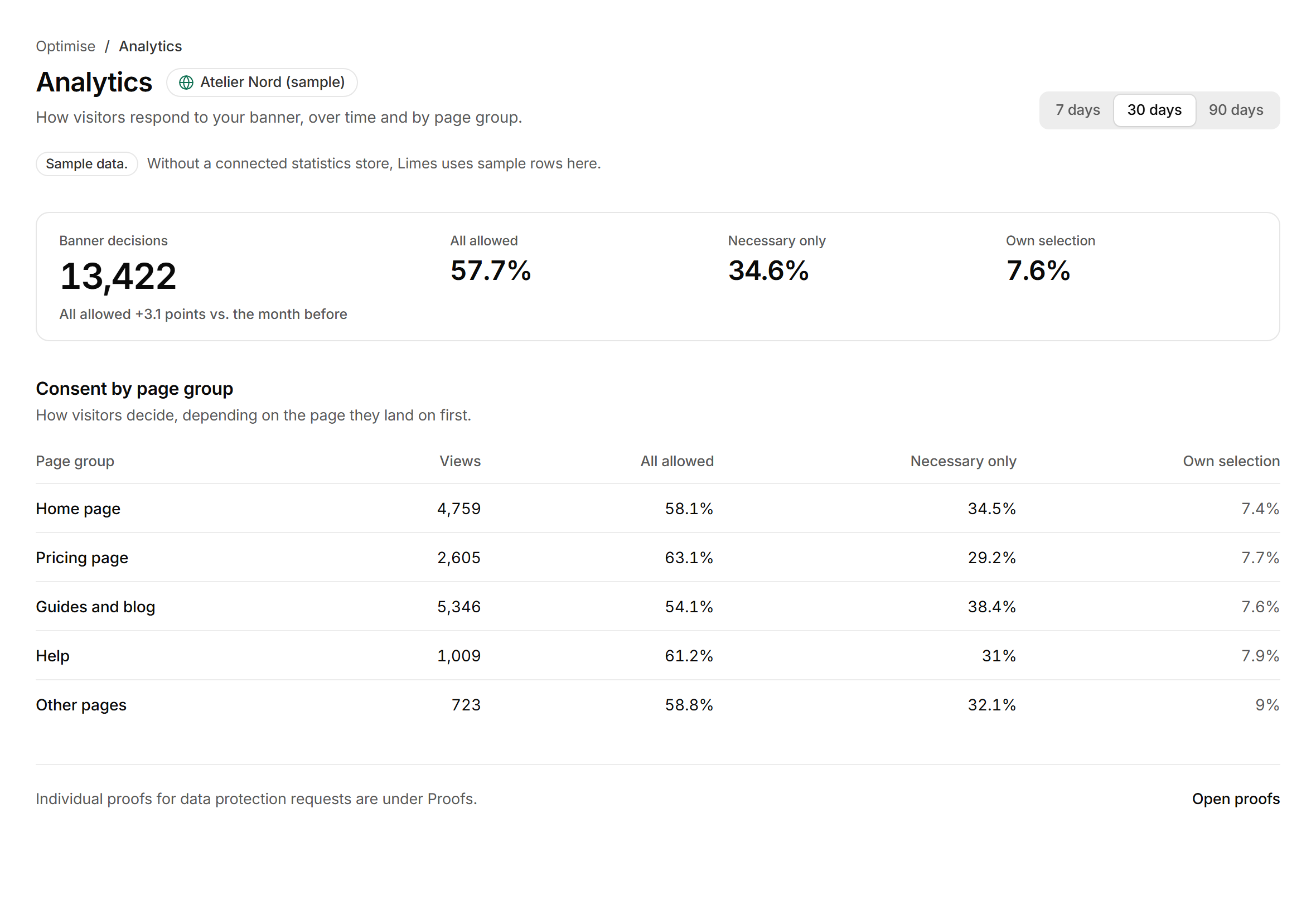
The overview shows the consent rate of the last 7 days on every plan, the Free plan included. The analytics page, called Consent rate in the app menu, shows banner decisions and the split between All allowed, Necessary only and Own selection for 7, 30 or 90 days, compared with the period before.
From the Professional plan (€29 a month on annual billing) the analytics page also shows the consent rate per variant in A/B tests and per region in geo rules, and a breakdown by page group. Page groups come from page group rules in the site configuration. You cannot edit those rules in the app yet. Without rules every page view counts as other, and the breakdown shows one row.
- Note the starting value in the overview.
- Let the banner run for at least one full week, so quiet weekdays do not skew the value.
- Change one thing, for example the purpose text, and compare the period after with the period before.
- For a result you can rely on, start an A/B test in which both variants pass the compliance check.
Frequently asked questions
How do you calculate a cookie consent rate?
Divide the decisions that allow at least one optional category by the number of banner impressions in the same period. Count an impression only on page views where the banner appeared, and leave out known bots.
What is a good cookie consent rate?
There is no general value you can rely on. Tools use different denominators, and many published figures come from banners without an equal reject option. Compare your site with itself, using the same formula over several weeks.
Is it legal to optimise the consent rate?
Yes, as long as the change makes the choice easier to understand and reject stays equal to accept. Language, placement and a specific purpose text are fair. Hidden reject buttons, pre-ticked boxes and scrolling as consent are not.
Sources
- Guidelines 05/2020 on consent under Regulation 2016/679, version 1.1(opens in a new tab) Adopted 4 May 2020. Paragraph 39 cookie walls, 64 minimum information, 67 plain language, 79 pre-ticked boxes, 86 scrolling.
- Regulation (EU) 2016/679, General Data Protection Regulation(opens in a new tab) Article 4(11) definition of consent, Article 7(1) proof, Article 7(3) withdrawal, Article 94(2) references to Directive 95/46/EC.
- Directive 2002/58/EC on privacy and electronic communications(opens in a new tab) Article 5(3) consent for storing or accessing information on a device.
- Report of the work undertaken by the Cookie Banner Taskforce(opens in a new tab) Paragraph 8 missing reject option, 10 pre-ticked boxes, 15 to 18 colours and contrast.
- Guidelines 03/2022 on deceptive design patterns in social media platform interfaces, version 2.0(opens in a new tab) Written for social media platforms. Patterns such as continuous prompting also appear in cookie banners.
- Judgment in Case C-673/17, Planet49(opens in a new tab) A pre-ticked checkbox is not valid consent to cookies.