Consent rate
Cookie banner A/B testing without dark patterns
On this page
The short answer
You can A/B test a cookie banner, as long as every variant collects valid consent on its own. You can test wording, placement and button layout. Do not test a variant that makes rejecting harder than accepting. Supervisory authorities assess each banner case by case and can treat the consent such a variant collects as invalid.
A test result you can act on needs one change per test, a sample size you calculate before launch, and a significance check you read once, at the end. This guide covers all three and shows how Limes computes the result.
What a fair test compares
Every variant offers the same choice. Accept, reject and settings sit on the first layer of the banner, at the same size and with the same legibility. The test measures how clearly the choice is presented and where it sits, not whether the visitor gets a choice at all.
Three kinds of change are worth testing:
- Wording. A shorter heading, a more specific accept label, or a plainer sentence on what statistics and marketing cookies do. The copy may explain. It may not pressure. A "Recommended" badge on the accept button steers the visitor toward one option. A reject label like "No, I don't want a better experience" is confirmshaming.
- Placement. Bottom bar, top bar, a box in a corner, or a centred box. Placement is a design choice. Paragraph 13 of the Taskforce report sets one limit: the banner must not give the impression that the visitor has to consent to reach the content.
- Layout. Buttons side by side, stacked, or in an inline bar, plus the order: reject first or accept first. In every layout the two buttons keep the same size, fill and font weight.
Change one thing per test
If variant B has new copy and a new position, the result cannot tell you which change moved the number. Test one change, promote the winner to control, then start the next test.
Whether a reject option exists is not a test question. In its report adopted on 17 January 2023, the EDPB Cookie Banner Taskforce recorded that a vast majority of supervisory authorities treat a banner with no reject option on any layer as an infringement. Such a variant wins because it removes the choice, and every consent it collects is open to challenge.
Sample size and statistical significance
Each variant gets a share of visitors. For each variant the script counts banner views and the decisions that include consent. In Limes a decision counts as consent when it allows statistics or marketing. The consent rate is consents divided by banner views.
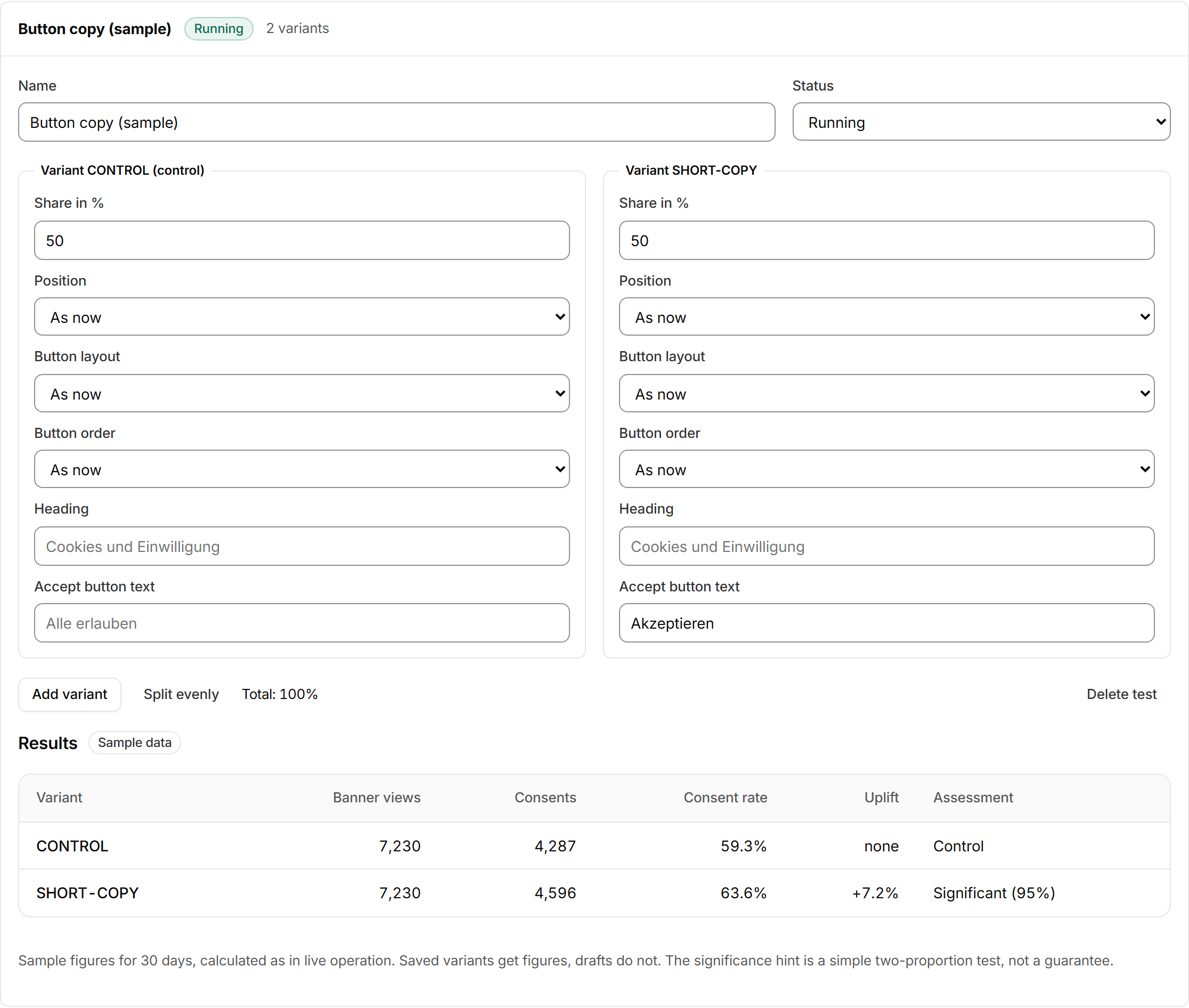
The Limes A/B tests view compares each variant with the control, the first variant, using a two-proportion z-test. It pools both groups into one shared rate, derives the standard error of the difference from it, and divides the difference between the two rates by that standard error. When the absolute z value is 1.96 or more, the view shows "Significant (95%)". That is a two-sided test at the 5 percent level. Below 1.96 it shows "Not conclusive yet", and with no banner views it shows "No data yet".
The label means a gap this large would rarely appear by chance if both variants performed the same. It does not tell you how large the gap will be over time, and it is not a guarantee. The view prints that note under every results table.
- Decide the smallest difference that would make you switch, for example 2 percentage points.
- Turn that into a sample size per variant with a two-proportion calculator at 95 percent confidence and 80 percent power. Worked example with a baseline of 0.50: detecting a difference of 0.05 takes about 1,560 banner views per variant, a difference of 0.02 about 9,800.
- Divide the banner views you need by the banner views each variant gets per day. Round up to whole weeks so weekdays and weekends are equally represented. The view keeps 30 days, so the longest test it can show in full is 4 weeks.
- Read the result once every variant has reached its sample size, not before.
What the count does not capture
The test assumes every banner view is independent, which is only roughly true. A visitor who ignores the banner sees it again on the next page, and each of those page loads counts as a banner view. A variant that people tend to ignore collects more views. Plan for a larger sample rather than a tight one.
The view shows the last 30 days. A test that runs longer drops its earliest data. Pick the smallest difference so that the sample size fits inside those 30 days.
Why every variant has to pass the compliance check
Consent is only valid if it meets Article 4(11) GDPR: freely given, specific, informed and unambiguous. Recital 32 GDPR rules out silence, pre-ticked boxes and inactivity as consent. For cookies and other storage on the visitor's device, Article 5(3) of the ePrivacy Directive requires consent based on clear and comprehensive information. It has two exceptions. The one that matters for websites covers storage that is strictly necessary for a service the user explicitly requested. Germany implements this rule in § 25 TDDDG.
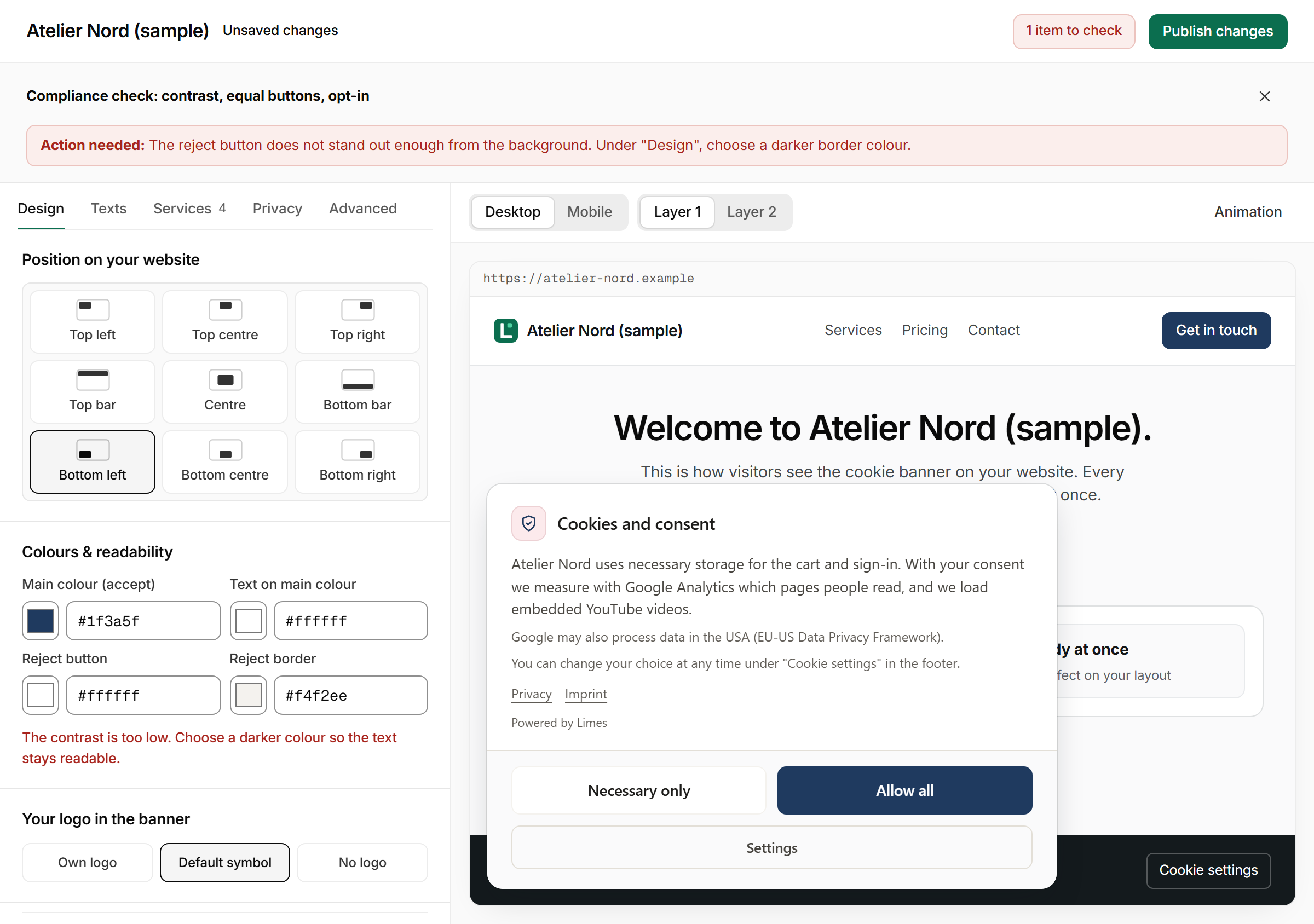
These requirements apply to each variant separately. A variant with a barely visible reject button may collect more consents, and supervisory authorities can treat those consents as invalid. In paragraph 18 of its report, the Cookie Banner Taskforce took the view that a reject button whose text has so little contrast with the button background that virtually no one can read it could be manifestly misleading. Paragraph 17 adds that no general colour or contrast standard can be imposed, so authorities assess each banner case by case.
The EDPB Guidelines 03/2022 on deceptive design patterns describe a pattern called "Hidden in plain sight". It uses visual style to steer users away from the privacy-friendly option. The guidelines give faint grey text on a white background as an example. They were written for social media interfaces, and the same patterns show up in cookie banners.
Withdrawal matters too. Article 7(3) GDPR requires withdrawing consent to be as easy as giving it. Paragraph 114 of the EDPB Guidelines 05/2020 on consent says that consent given with one mouse click must be just as easy to withdraw. If a variant lets visitors consent with one click, withdrawing that consent must also take no more than one click.
The Limes compliance check therefore runs on every draft and running test variant, not just the base banner. It checks text contrast on both buttons and in the banner copy against the WCAG AA ratio of 4.5:1 from success criterion 1.4.3. It checks that the reject button's fill or border stands out from the banner background by at least 3:1, the ratio WCAG success criterion 1.4.11 sets for user interface components. WCAG itself does not require a visible boundary on a button with readable text, so this Limes rule is stricter. It also scans the heading, body and button labels for a list of pushy German phrases, among them "Empfohlen" (recommended) and "Nein, ich möchte nicht" (no, I don't want to). If any variant fails, Limes refuses to save, and no part of the test goes live.
Running a test in Limes
A/B tests are included from the Professional plan, at €29 per month on annual billing. The pricing page compares the plans and the features page lists everything else.
- In the app, open A/B tests under Optimise and create a new test. A test has 2 to 4 variants. The first variant is the control.
- Change one thing per variant: position, button layout, button order, heading or the accept button text. Fields left on "As now" keep the base banner's value.
- Set the shares. They must add up to exactly 100, and "Split evenly" divides them equally.
- Set the status to Running and save. Limes checks every variant and rebuilds the banner script. The script serves only the first running test, and the check warns you if two are running.
- Wait until every variant reaches its planned sample size. Then read the Banner views and Consents columns and the label in the Assessment column.
- Copy the winning variant into the banner editor and set the test to Stopped.
How the script assigns visitors
The script assigns each visitor to a variant by hashing the test ID together with a visitor ID and weighting the result by the shares. The same ID always lands in the same variant. Before a decision, the visitor ID is a random ID kept in the browser tab's sessionStorage. After a decision, it is the ID of the stored consent record. A new tab opened before any decision can therefore show a different variant.
The sessionStorage entry is itself storage on the visitor's device under Article 5(3) of the ePrivacy Directive. You and your data protection officer decide whether the strictly necessary exemption covers it.
To read your consent rate outside a test and see what moves it, start with the guide on cookie consent rate.
Frequently asked questions
Is it legal to A/B test a cookie banner?
Neither the GDPR nor the ePrivacy Directive prohibits testing. They require every consent to be freely given, informed and unambiguous, and that applies to each variant on its own. Only test variants where accept and reject sit on the first layer with equal weight.
How long should a cookie banner A/B test run?
Until every variant has reached the sample size you calculated in advance, and at least one full week. Divide the sample size per variant by the daily banner views per variant and round up to whole weeks.
Can a variant show reject as a text link instead of a button?
The EDPB Cookie Banner Taskforce found no valid consent when the only alternative to accepting is a link such as "refuse" inside a paragraph of banner text or outside the banner, without enough visual support to draw attention to it. A variant like that skews both the test and the consents it collects.
Sources
- Report of the work undertaken by the Cookie Banner Taskforce(opens in a new tab) Paragraph 8 on a missing reject option, 13 on access to content, 14 on reject links, 17 and 18 on colour and contrast.
- Guidelines 03/2022 on deceptive design patterns in social media platform interfaces, Version 2.0(opens in a new tab) Hidden in plain sight, Annex I checklist 4.3.2.
- Guidelines 05/2020 on consent under Regulation 2016/679(opens in a new tab) Paragraph 79 on pre-ticked boxes, 113 and 114 on withdrawal.
- Regulation (EU) 2016/679, General Data Protection Regulation(opens in a new tab) Article 4(11), Article 7(3) and Recital 32.
- Directive 2002/58/EC, Directive on privacy and electronic communications, consolidated version of 19 December 2009(opens in a new tab) Article 5(3), as amended by Directive 2009/136/EC.
- Directive 2009/136/EC amending Directive 2002/58/EC(opens in a new tab) Article 2(5) introduced the consent requirement in Article 5(3).
- § 25 TDDDG, Schutz der Privatsphäre bei Endeinrichtungen(opens in a new tab)
- Understanding Success Criterion 1.4.11: Non-text Contrast(opens in a new tab) 3:1 contrast for user interface components.
- Understanding Success Criterion 1.4.3: Contrast (Minimum)(opens in a new tab) 4.5:1 contrast for text.